Imagine this: you’re driving along, the sun is shining, and suddenly, a car cuts you off from behind. Or maybe you witness a fender-bender right in front of you. What if you could have a crystal-clear recording of everything that happens on the road, not just in front, but behind you too? That’s where a rear view dash cam comes in, and it’s becoming a must-have for smart drivers.
But let’s be honest, choosing the perfect rear view dash cam can feel like navigating a maze. With so many brands, features, and confusing jargon, it’s easy to feel overwhelmed. You want something that’s reliable, easy to use, and actually helps you out when you need it most. You might be wondering about video quality, how it attaches, or if it’s even worth the investment.
Don’t worry, we’ve got your back! This post will break down everything you need to know about rear view dash cams. We’ll explore the coolest features, explain what makes a good one, and help you avoid common mistakes. By the time you finish reading, you’ll be a pro at picking the right camera to keep you and your vehicle safe and protected, no matter what the road throws your way.
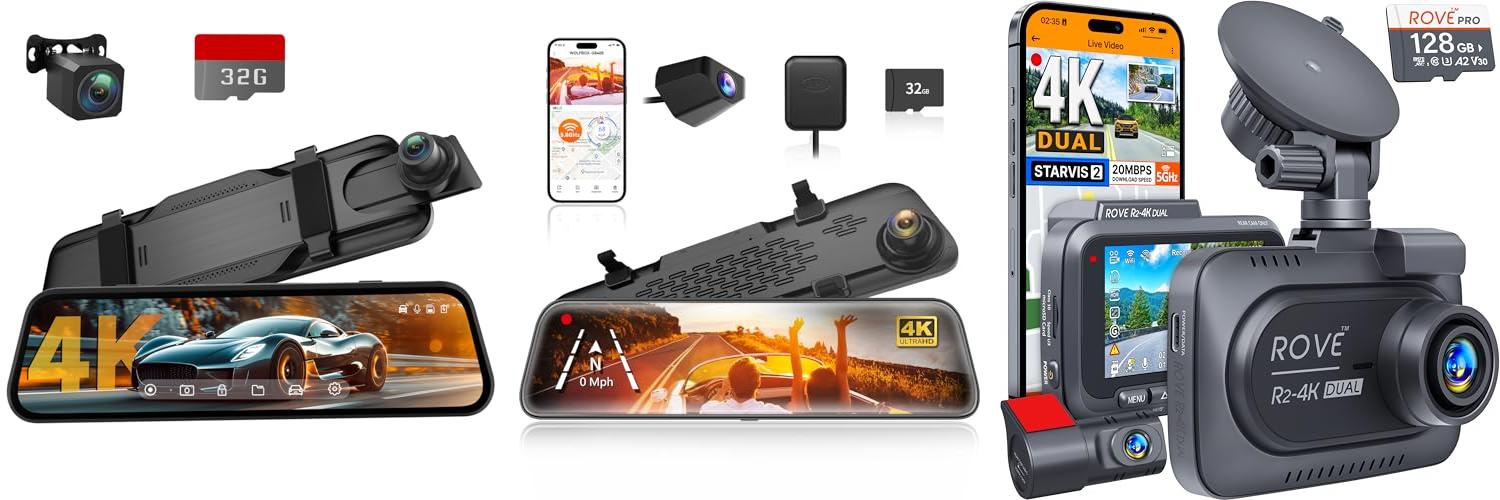
Our Top 5 Rear View Dash Cam Recommendations at a Glance
Top 5 Rear View Dash Cam Detailed Reviews
1. Veement 4K Rear View Mirror Camera

Rating: 9.2/10
The Veement 4K Rear View Mirror Camera is a fantastic upgrade for any car. This 10-inch mirror dash cam not only records in crystal-clear 4K up front but also includes a 1080P backup camera for safe reversing. It’s packed with smart features to make driving safer and more convenient.
What We Like:
- Amazing picture quality with 4K front and 1080P rear cameras.
- Super night vision and a wide F1.8 aperture mean clear videos even in the dark.
- The large 10-inch touchscreen is super easy to use for adjusting settings.
- Voice control lets you lock videos or take pictures without taking your hands off the wheel.
- Wide-angle lenses (170° front, 160° rear) help you see more and avoid blind spots.
- It automatically shows the rear camera view when you put the car in reverse.
- The 24-hour parking monitor keeps an eye on your car even when it’s parked.
- The G-sensor locks important footage if it detects a crash, providing proof.
- A 32GB SD card is included, so you can start recording right away.
What Could Be Improved:
- The 24-hour parking monitor requires a separate three-conductor step-down cable, which isn’t always clearly advertised.
This Veement dash cam offers a great combination of advanced features and user-friendly design. It’s an excellent tool for capturing your drives and improving your car’s safety.
2. WOLFBOX G840S 12″ 4K Mirror Dash Cam Backup Camera

Rating: 9.0/10
The WOLFBOX G840S 12″ 4K Mirror Dash Cam is a smart rearview mirror that upgrades your car’s safety and convenience. It offers a crystal-clear 4K front camera and a 1080p rear camera, giving you a much wider view than a standard mirror. This means fewer blind spots, which is great for driving and parking.
What We Like:
- Amazing 4K picture quality on the front camera and clear 1080p on the back.
- The big 12-inch screen shows you a lot more of what’s happening around your car.
- Connects to your phone with 5.8GHz Wi-Fi, letting you see live video and save recordings easily.
- Built-in GPS tracks your trips and shows your location.
- Wide-angle lenses (170° front, 140° rear) capture more of the road.
- Great night vision thanks to WDR, HDR, and a good sensor with a 6-glass lens.
- 24-hour parking monitor keeps an eye on your car even when it’s off (needs a hardwire kit).
- USB-C power port is more reliable and prevents overheating.
- Includes a 32GB memory card to get you started.
What Could Be Improved:
- Parking monitoring requires a separate hardwire kit, which is an extra cost.
- The app interface could be more intuitive for some users.
This dash cam is a fantastic upgrade for any driver looking for better visibility and security on the road. Its advanced features and user-friendly design make it a worthwhile investment for peace of mind.
3. ROVE R2-4K DUAL Dash Cam Front and Rear

Rating: 9.1/10
The ROVE R2-4K DUAL Dash Cam is your ultimate co-pilot, capturing every moment on the road with stunning clarity, day or night. This powerful system includes both front and rear cameras, a huge 128GB memory card, and super-fast WiFi, making it easy to keep your vehicle safe and document your travels.
What We Like:
- It records in super sharp 4K up front and clear 1080P in the back, so you won’t miss any details.
- The special Sony STARVIS 2 sensor and big camera openings make nighttime driving footage bright and easy to see.
- You can quickly download videos to your phone with its super-fast 5G WiFi, up to 20MB/s!
- Built-in GPS shows your speed and location, and you can even see this data on your computer later.
- It has a smart parking mode that watches out for your car 24/7, even when you’re not there.
- Comes with a free 128GB card, and can handle cards up to a massive 1TB.
- The 3-inch screen is clear and easy to view.
What Could Be Improved:
- The parking mode requires a separate hardwire kit, which means an extra purchase.
This dash cam offers excellent video quality and helpful features for drivers. It’s a solid choice for anyone wanting extra security and peace of mind on the road.
4. REDTIGER Dash Cam Front Rear

Rating: 9.0/10
The REDTIGER F7NP Dash Cam is a powerful tool for car owners. It records your drives in amazing detail, front and back, so you have clear proof if something unexpected happens. With its smart features and easy-to-use app, it’s a great way to keep track of your travels and stay safe on the road.
What We Like:
- Records in super clear 4K and 1080P, so you can see license plates and signs easily.
- It has a wide view, 170 degrees in front and 140 degrees in back, to catch more of the road.
- Great night vision helps you see clearly even when it’s dark.
- You can connect it to your phone with Wi-Fi to watch and save videos.
- Built-in GPS records your speed and where you’ve been, which can be helpful.
- It keeps recording even if the memory card is full thanks to Loop Recording.
- The G-sensor saves important videos automatically if it senses a crash.
- 24-hour parking mode keeps an eye on your car when it’s parked.
- Comes with a 32GB memory card.
What Could Be Improved:
- You need to buy a separate hardwire kit for the 24-hour parking mode.
- The car charger needs a car’s cigarette lighter; a USB-C cable might need to be purchased separately if your car doesn’t have one.
This dash cam offers excellent recording quality and useful safety features for your peace of mind.
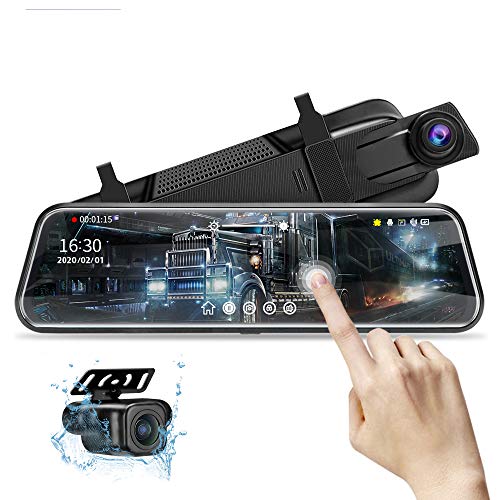
5. 10” Mirror Dash Cam Night Vision 1080P FHD Full Touch Screen Front and Rear View Backup Camera for Cars Loop Recording Streaming Media 170°Wide Angle Parking Assistance with 10 Meters Cable
Rating: 8.5/10
Upgrade your driving experience with the 10” Mirror Dash Cam. This advanced camera system gives you a crystal-clear view of the road ahead and behind, day or night. Its large touch screen makes it easy to use, and the included long cable simplifies installation.
What We Like:
- Dual 1080P cameras provide super clear video, even at night.
- The 10-inch IPS touch screen is big and easy to navigate.
- It has a 33ft cable, which is great for longer vehicles.
- The parking assistance feature helps you back up safely.
- Loop recording means you won’t run out of space.
- The G-Sensor automatically saves important crash footage.
- It supports up to 128GB SD cards for lots of recording.
- Parking Monitor keeps an eye on your car when it’s off.
- It has helpful upgrades like adjustable reversing lines and better night vision.
What Could Be Improved:
- The mirror finish is optimized for the screen, so it’s not a reflective mirror when the screen is off.
- You need to check your original rearview mirror’s size and weight capacity before buying.
This mirror dash cam offers excellent safety and convenience for any driver. It’s a smart investment for better visibility and peace of mind on the road.
Choosing the Best Rear View Dash Cam: Your Complete Guide
A rear view dash cam is like a second set of eyes for your car. It watches the road behind you. This can help you in many ways. It can record accidents. It can also help you when you park. It can even capture beautiful scenery on your drives. Let’s find the best one for you.
Key Features to Look For
When you shop for a rear view dash cam, some features are really important.
- Video Quality: You want clear pictures. Look for cameras that record in at least 1080p HD. Some offer even better quality. This helps you see details clearly.
- Field of View: This is how wide the camera can see. A wider field of view, like 140 degrees or more, captures more of the road. This means it can see more of what’s happening behind you.
- Night Vision: Driving at night can be tricky. Good night vision uses infrared lights. These lights help the camera see in the dark. It makes recordings clearer when it’s dark outside.
- Loop Recording: This feature means the camera keeps recording even when its memory card is full. It erases the oldest footage and records new footage. This way, you never miss anything important.
- G-Sensor: This is a smart sensor. It detects sudden movements like braking or a crash. When it detects an impact, it locks the current video. This protects that important recording from being erased.
- Parking Mode: This is useful when your car is parked. The camera can automatically start recording if it detects a bump or movement. It helps catch hit-and-run drivers.
- Wi-Fi Connectivity: Some cameras let you connect to your phone. You can then view recordings or download them easily.
Important Materials and Build Quality
The materials used in a dash cam affect how long it lasts.
- Lens: The lens is very important. Glass lenses are usually better than plastic ones. They provide clearer images.
- Body: Look for cameras made with strong plastic. This helps them last longer. Some cameras also have metal parts for extra toughness.
- Mount: A good mount keeps the camera steady. Suction cup mounts are common. Some cameras come with adhesive mounts. Make sure the mount is strong and easy to use.
Factors That Improve or Reduce Quality
Some things make a dash cam work better, while others can make it worse.
- Image Sensor: A better image sensor captures more light. This leads to clearer videos, especially in low light.
- Processor: A fast processor helps the camera record smoothly. It can also handle advanced features like image stabilization.
- Temperature Range: Dash cams can get hot in a car. Check the operating temperature range. A wider range means it will work better in different weather.
- Battery Life: Some cameras have small built-in batteries. These are mostly for saving recordings when the power goes out. Most cameras are powered by the car’s charger.
User Experience and Use Cases
Using a rear view dash cam is usually simple.
- Installation: Most cameras are easy to install. You usually plug them into your car’s cigarette lighter. Then, you attach the mount to your windshield.
- Operation: Once installed, many cameras start recording automatically when you start your car. You can usually adjust settings through buttons on the camera or a smartphone app.
- Use Cases:
- Safety: Record accidents or near misses.
- Evidence: Provide proof in case of a traffic dispute or crime.
- Parking: Catch anyone who bumps your parked car.
- Travel: Capture scenic drives and memorable moments.
Frequently Asked Questions (FAQ)
Q: What is the main purpose of a rear view dash cam?
A: The main purpose is to record video of what happens behind your car. This can help with safety, evidence, and parking.
Q: Do I need a separate memory card for a rear view dash cam?
A: Yes, most rear view dash cams require a microSD card to store recordings. Check the type and size of card recommended by the manufacturer.
Q: Can a rear view dash cam record in color at night?
A: Many rear view dash cams have night vision. This uses infrared LEDs to see in the dark. The footage might look black and white, but it’s still clear enough to see details.
Q: How do I power a rear view dash cam?
A: Most rear view dash cams are powered by plugging them into your car’s 12V power outlet (cigarette lighter). Some may also have a small internal battery.
Q: Is it legal to use a rear view dash cam everywhere?
A: Laws about dash cams can be different in different places. It’s a good idea to check the rules in your area before using one.
Q: Will a rear view dash cam drain my car’s battery?
A: If you only use it when the car is running, it won’t drain your battery. If you use parking mode, it might use a little battery. Some cameras have a low-voltage cutoff to prevent this.
Q: How do I update the software on my rear view dash cam?
A: Some cameras allow software updates. You usually download the update file to a memory card and then insert it into the dash cam.
Q: What is the difference between a front and a rear view dash cam?
A: A front dash cam records what’s in front of your car. A rear view dash cam records what’s behind your car. Some systems have both.
Q: Can I view the recordings on my phone?
A: Many modern rear view dash cams have Wi-Fi. This lets you connect to your phone using an app to view and download recordings.
Q: How long will a dash cam record for?
A: Dash cams record until the memory card is full. Then, loop recording erases the oldest files to make space for new ones.
In conclusion, every product has unique features and benefits. We hope this review helps you decide if it meets your needs. An informed choice ensures the best experience.
If you have any questions or feedback, please share them in the comments. Your input helps everyone. Thank you for reading.

Hi, I’m Sean Kernan, the voice behind esteeringwheel.com.. With a passion for all things automotive, I created this platform to share my journey, insights, and expertise about cars. From the latest tech to timeless driving tips, my goal is to help fellow enthusiasts and everyday drivers navigate the fascinating world of automobiles. Welcome to my corner of the road—let’s steer toward knowledge and discovery together!